OffersImprove this page
Fidel's Offers marketplace is available on the Offers tab, where you can see all available offers to your reward programs.
Offer Lifecycle
Offers can be accessed via the Fidel Dashboard. They are grouped into six categories: Marketplace, Requests, Upcoming, Live, Expiring soon and Expired.
Marketplace
All Fidel marketplace offers available to your reward programs will be visible here. These have not yet been added to your program.
Requests
Offers that require approval from the Content Provider will be available here until they have been accepted or declined.
Upcoming
Offers with at least one Location linked, but with a startDate in the future. Offers in this category will automatically become "live" when the startDate is reached.
Live
The current date is between the Offer startDate and endDate. The Offers in this category have been added to one of your reward programs and you are tracking live transactions against them.
If no endDate is provided when creating an Offer, it will have a default end date of 12 months from its startDate. The Offer can be extended at any time for another 12 months from the current date by the Content Provider, and you will be notified via the relevant webhook. Please see webhooks for more details. Self-sourced offers are exempt from this requirement.
Expiring soon
Offers currently live on your reward program that are approaching their endDate. Offers in this category will automatically move to "Expired" when the endDate is reached.
The Dashboard includes an "expires in" filter to view offers expiring within a specific number of days. The filter provides preset values for quick filtering and also accepts custom day values. By default, it displays offers expiring within 30 days.
Expired
Offers with an endDate that has passed. You should not be tracking transactions against expired offers.
Self-sourced Offers
The following sections are for any self-sourced offers which you want to add to your reward program. Fidel will only do the reconciliation and billing for Fidel marketplace offers. Any self-sourced offers will need to be created, maintained, reconciled and billed by the Publisher.
Get Marketplace Offers
Retrieves all available offers from the Fidel Marketplace. Publishers use this endpoint to browse and discover offers from content providers and adopt them into their programs.
Filter by brand, channel, country, or network to surface the most relevant offers. By default, only available offers are returned, with pagination and sorting supported for easy browsing.
12345curl --request GET \
     --url 'https://api.fidel.uk/v1/marketplace-offers?order=asc' \
     --header 'Content-Type: application/json' \
     --header 'accept: application/json'
Creating a Self-sourced Offer
There are multiple options for creating a new self-sourced Offer. You can create an Offer via the Fidel Dashboard in the Offers section, or use the Create Offer API endpoint.
Create an Offer via Dashboard
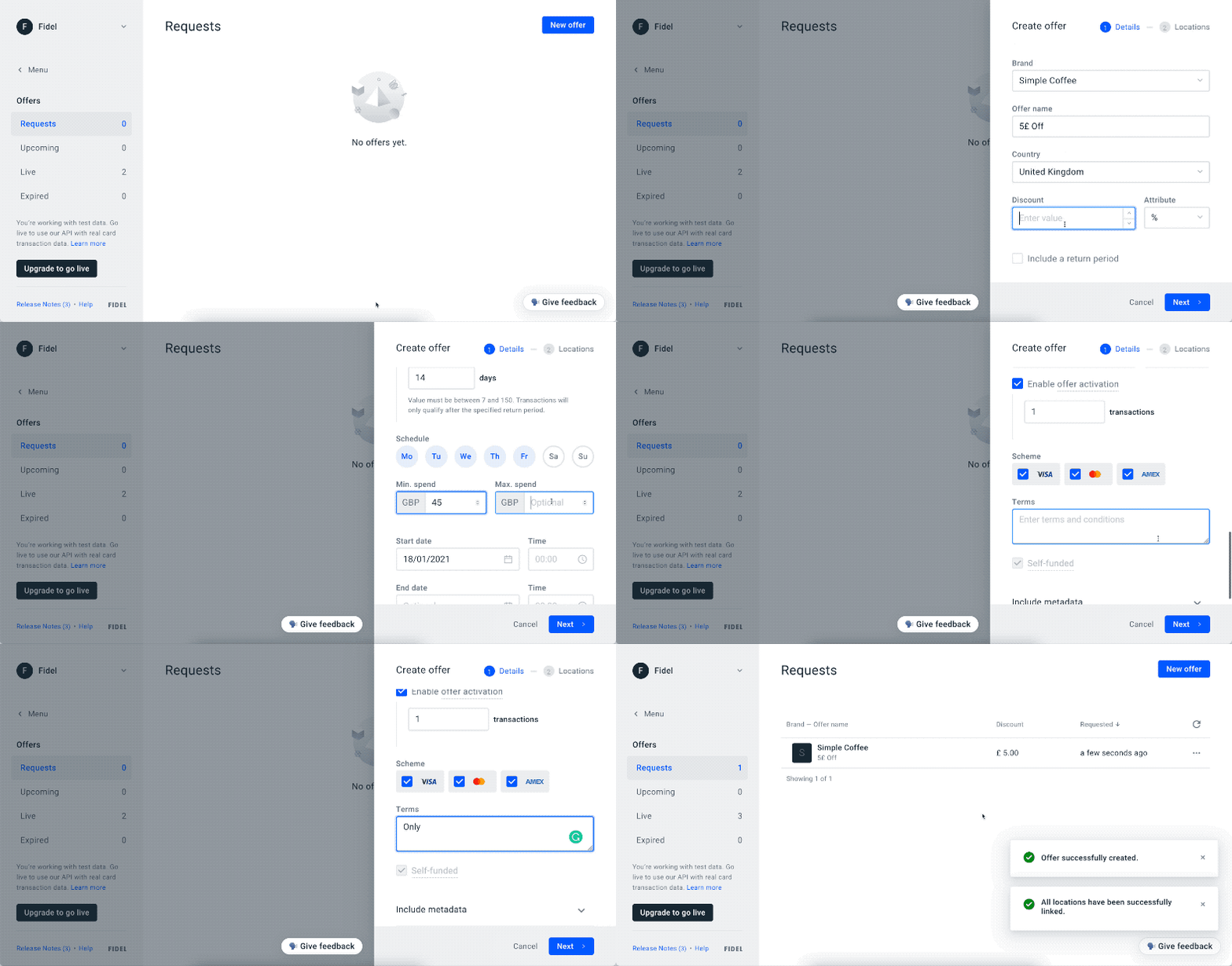
Once you have created an Offer, it will enter the Offer Lifecycle in the Requests category.
Create an Offer via Offers API
Here's a cURL example of using the endpoint, with only the minimum required parameters:
12345678910111213141516curl -X POST https://api.fidel.uk/v1/offers \
  -H 'Content-Type: application/json' \
  -H 'Fidel-Key: <KEY>' \
  -d '{
        "countryCode": "GBR",
        "name":"20% Off Netflix Subscription",
        "publisherId":"3693ac7e-3e2b-432c-8c60-2b786453ca9b",
        "brandId":"f8bdb5e7-85c3-4acb-8a59-1b7e9218e412",
        "startDate":"2020-04-25T00:00:00",
        "transactionSource": "oaas",
        "type":{
          "name":"discount",
          "value":20
        }
      }'
Required Parameters
These are the minimum required parameters to create a new Offer:
brandId: Unique identifier for the Brand presenting the Offer.countryCode: Country where the Offer will be available.name: Name of your Offer.publisherId: Unique identifier for you, the same as your FidelaccountId.startDate: The start date for the Offer. ThestartDatetime will be a local time relative to the Location where the Offer is active.type: name: Type of the Offer. Valid names are"amount"and"discount".type: value: Numeric value of the discount associated with the Offer.
Offers with the type amount will use the indicated country's currency and apply the value as the amount of the discount, for example, £20 Off. The discount type applies the value as a percentage discount, for example, 20% Off.
Optional Parameters
There are a range of optional parameters available, which influence how the Offer behaves on the Fidel platform. You can read more about the endpoint's full specification on our API Reference.
daysOfWeek: Array of numbers, with possible values from0to6, to indicate the days of the week.0= Sunday,1= Monday, etc.endDate: The date to automatically end the Offer. Same asstartDate, the time will be a local time relative to the Location where the Offer was active. A default 12 months lifeline is added to theendDateif noendDateis provided. This can be extended at any time to further 12 months.funded: id: Unique identifier for the account that funds the Offer. For self-funded Offers, this is not required. In the test environment, all Offers are self-funded, so this will always be the same as youraccountId.minTransactionAmount: Minimum transaction amount to qualify for the offer. For example, if your offer is to save 25% on purchases over £50, then the Offer should have aminTransactionAmountof£50.metadata: Object with your own metadata, will be returned on the Offer object.returnPeriod: Number of days between when a Transaction was created and when a Transaction qualifies for the Offer. The qualified Transaction will have theoffer.qualificationDateset to the creation date plus the number of days in the return period.schemes: Array of schemes for which a Transaction qualifies for the Offer. Possible values are"amex","mastercard"and"visa".type: maxRewardAmount: Numeric value of the maximum amount to be awarded for the Offer. This only applies todiscounttype offers. For example, a 10% reward with a max reward amount of 10 can't generate a reward larger than £10, even if the transaction amount is higher than £100.targeting.name: Type of customer targeting applied to the offer.new→ Customer has not transacted within the defined lookback windowlapsed→ Customer previously transacted, but has been inactive for a defined periodexisting→ Customer has transacted recently within the defined lookback window
targeting.from: Defines the start of the lookback window in days. This field is required when usinglapsedorexistingtargeting types. Example: Iffrom = 180, the targeting evaluation starts from 180 days ago.targeting.to: Defines the end of the lookback window in days. This field is required when usinglapsedorexistingtargeting types. Maximum supported value:365. Example: Ifto = 365, the targeting evaluation includes customer activity up to 365 days ago.
Offer Targeting Fields
Offer Targeting Fields introduce native customer segment targeting directly into the Fidel offer model. Content Providers can define eligibility rules for New, Lapsed, and Existing customers directly on an offer, enabling Publishers to reward transactions based on historical shopping behaviour and customer lifecycle status. You can read more about the endpoint's full specification on our Create Offer API.
Key Features
- Optional feature — existing offers remain unaffected
- Targeting rules can be updated on live offers
- Maximum lookback window: 365 days
- Changes to targeting rules trigger webhook notifications to Publishers
- Fidel does not validate customer segment tags — the Publisher remains the source of truth
- Supports targeting for:
- New customers
- Lapsed customers
- Existing customers
Offer Configuration
When creating or updating an offer, a targeting configuration can optionally be added to define:
Customer segment type:
newlapsedexisting
Lookback window:
- Defined using a day range
- Maximum supported range: 365 days
Transaction Processing
When submitting transactions against a targeted offer, the Publisher includes a customer segment tag in the transaction payload. Fidel compares the submitted segment tag against the targeting rules configured on the offer to determine eligibility.
Fidel does not independently validate segment tags against transaction history. Validation is performed upstream by the Publisher.
Eligibility Logic
Match The transaction segment tag matches the offer targeting rules. Result: Transaction is eligible and the reward is applied.
No Match The transaction segment tag does not match the offer targeting rules. Result: Transaction is ineligible and no reward is applied.
No Targeting Defined The offer does not contain a targeting configuration. Result: All transactions remain eligible (default behaviour).
Supported Audience Types
| Audience Type | Definition | Goal |
|---|---|---|
| New | No spend at the brand within the defined lookback window (e.g. 0–90 days) | Acquire first-time shoppers |
| Lapsed | Last transaction occurred within a defined inactive period (e.g. 180–365 days ago) | Re-engage inactive customers |
| Existing | Customer has transacted within the defined recent period (e.g. within the last 90 days) | Increase loyalty and reward active shoppers |
Webhook Notifications
Any update to a live offer's targeting configuration triggers a webhook notification to the Publisher.
This includes changes to:
- Customer segment type
- Lookback day range
- Targeting configuration values
This ensures Publishers remain synchronised with the latest eligibility rules applied to active offers.
Offer Object
The Offers API's central piece of data is the Fidel Offer object, which holds all the details about a card-linked Offer. The Offer object will be returned by the API in a multitude of situations.
The Offer object looks similar to the following:
1234567891011121314151617181920212223242526272829303132333435363738394041424344454647484950{
  "id": "feb9af3c-9b4e-49df-bb8f-13ae4ad8cd22",
  "accepted": true,
  "additionalTerms": null,
  "brandId": "f8bdb5e7-85c3-4acb-8a59-1b7e9218e412",
  "brandName": "API Reference",
  "brandLogoURL": "https://example.com/logo.png",
  "countryCode": "GBR",
  "created": "2020-07-29T13:45:36.191Z",
  "currency": "GBP",
  "daysOfWeek": [0, 1, 2, 3, 4, 5, 6],
  "endDate": null,
  "funded": {
    "id": "3693ac7e-3e2b-432c-8c60-2b786453ca9b",
    "type": "card-linking"
  },
  "fees": {
    "publisherFee": 5,
    "fidelFee": 5
  },
  "live": true,
  "locationsTotal": -1,
  "maxTransactionAmount": 0,
  "minTransactionAmount": 0,
  "metadata": null,
  "name": "5% Off Netflix Every Month",
  "origin": {
    "id": "3693ac7e-3e2b-432c-8c60-2b786453ca9b",
    "type": "card-linking"
  },
  "publisherId": "3693ac7e-3e2b-432c-8c60-2b786453ca9b",
  "returnPeriod": 15,
  "schemes": ["amex", "mastercard", "visa"],
  "startDate": "2020-06-30T00:00:00",
  "supplier": null,
  "targeting": {
    "name": "new",
    "from": 0,
    "to": 90
  },
  "type": {
    "name": "discount",
    "maxRewardAmount": 10,
    "value": 5
  },
  "transactionSource": "oaas",
  "status": "live",
  "updated": "2020-08-22T14:47:37.479Z"
}
Parameters
idstring: Unique identifier for the object.acceptedboolean: Whether the Offer was accepted by the Brand.additionalTermsstring: Support for additional Terms & Conditions related to the Offer.nullby default.brandIdstring: Unique identifier of the associated Brand.brandNamestring: Name of the associated Brand.brandLogoURLstring: Logo URL of the associated Brand.nullby default.countryCodestring: ISO 3166-1 alpha-3 country code for the Country where the Offer is active.createddate: ISO 8601 date and time in UTC representing the creation date for the Offer object.currencystring: ISO 4217 currency code based on thecountryCodevalue.daysOfWeekarray of numbers: Array of numbers between0and6representing the days of the week for which the Offer is active. Starting with Sunday.endDatedate: Date and time, in theYYYY-MM-DDThh:mm:ssformat, for when the Offer expires. Note: Time is local to the Location. Defaults to 12 months for Offers that do not have an end date passed at creation phase.fundedobject: Contains anidproperty, with the unique identifier for the account that is funding the Offer. Also contains a stringtypeproperty, for the type of account that is funding the Offer. The type can have one of the values"merchant"|"card-linking"|"affiliate".feesobject: ContainspublisherFeeandfidelFeeproperties representing the fee values.liveboolean: Whether the Offer should be created in the live or test Fidel environment.locationsTotalnumber: Total number of Locations linked to the Offer. Always-1in OaaS.maxTransactionAmountnumber: Maximum transaction amount generating a proportional reward.minTransactionAmountnumber: Minimum amount needed for a Transaction to qualify for the Offer.namestring: Name of the Offer.metadataobject: Metadata to be associated with the Offer. Defaults tonull.originobject: Contains anidproperty, with the unique identifier for the account that created the Offer. Also contains a stringtypeproperty, for the type of account that created the Offer. The type can have one of the values"merchant"|"card-linking"|"affiliate".publisherIdstring: Unique identifier of the Publisher. Refers toaccountId.returnPeriodnumber: Number of days before a Transaction qualifies for the Offer.schemesarray of strings: Card Schemes for which the Offer is valid. Possible values in the array arevisa,mastercardandamex.startDatedate: Date and time, in theYYYY-MM-DDThh:mm:ssformat, for when the Offer is activated and starts qualifying transactions.statusstring: Offer status corresponding to the state in the Offer Lifecycle. Can be one ofrequests,upcoming,liveorexpired.supplierobject: Contains anidproperty, with the unique identifier for the account that supplies the Offer. Also contains a stringtypeproperty, for the type of account that supplies the Offer. The type can have one of the values"merchant"|"card-linking"|"affiliate". Defaults tonull.targetingobject: Containsname(customer segment type:new,lapsed, orexisting),from(start of lookback window in days), andto(end of lookback window in days).nullif no targeting is configured.typeobject: Represents the type of Offer: a fixed amount or a percentage of the original transaction. Thenameproperty can have one of the following two values:amountanddiscount. Thevalueproperty has either the fixed amount of currency to be rewarded or the percentage value, depending on the Offer type. ThemaxRewardAmountproperty has a maximum fixed amount of currency to be rewarded for percentage typed Offers.maxRewardAmountonly applies todiscountOffers, and will benullforamountOffers.transactionSourcestring: The source of transaction data. For OaaS offers, this will be"oaas".updateddate: ISO 8601 date and time in UTC representing the last time the Offer object was updated.
Extending Self-sourced Offers
If you need to extend a self-sourced Offer beyond its original endDate, you can update the Offer to set a new end date. This is useful when you want to continue running a successful campaign or need to accommodate changes in your promotion schedule.
Extending an Offer via API
You can extend an Offer by using the Update Offer endpoint from the Offers API. Simply provide a new endDate value that is later than the current end date.
Here's a cURL example of extending an Offer:
12345678curl -X PATCH \
  https://api.fidel.uk/v1/offers/feb9af3c-9b4e-49df-bb8f-13ae4ad8cd22 \
  -H 'Content-Type: application/json' \
  -H 'Fidel-Key: <KEY>' \
  -d '{
        "endDate": "2020-12-31T23:59:59"
      }'
Extending an Offer via Dashboard
To extend an Offer using the Fidel Dashboard, navigate to the Offers section, select the Offer you want to extend, and click the edit button. You can then update the end date field to your desired date.

Important Considerations
- The new
endDatemust be in the future from the current date.
Deleting Offers
You can delete offers in the Fidel API Dashboard, or using the API's Delete Offer endpoint.
Note: Only self-sourced offers created by Publishers can be deleted. Offers from Content Providers or the Fidel Marketplace cannot be deleted.
12345curl -X DELETE \
  https://api.fidel.uk/v1/offers/ec80c3a1-0899-4e10-abdf-2dfb699b509c \
  -H 'Content-Type: application/json' \
  -H 'Fidel-Key: sk_test_50ea90b6-2a3b-4a56-814d-1bc592ba4d63'
API Reference
If you're looking to find out more about our Offers API and how to use it with your application, please visit the Fidel API Reference.